

A strong casino SSO setup is not just a login convenience. For an online casino, single sign-on becomes the control layer for every sensitive action in the backoffice: viewing player data, approving withdrawals, changing bonus rules, managing game content, exporting reports, and investigating suspicious activity.
That is why SSO should be designed before launch, not patched in after the first operational incident. In iGaming, a weak admin access model can create fraud exposure, privacy risk, compliance gaps, and avoidable downtime. A good setup gives your team speed without giving everyone the keys to the vault.
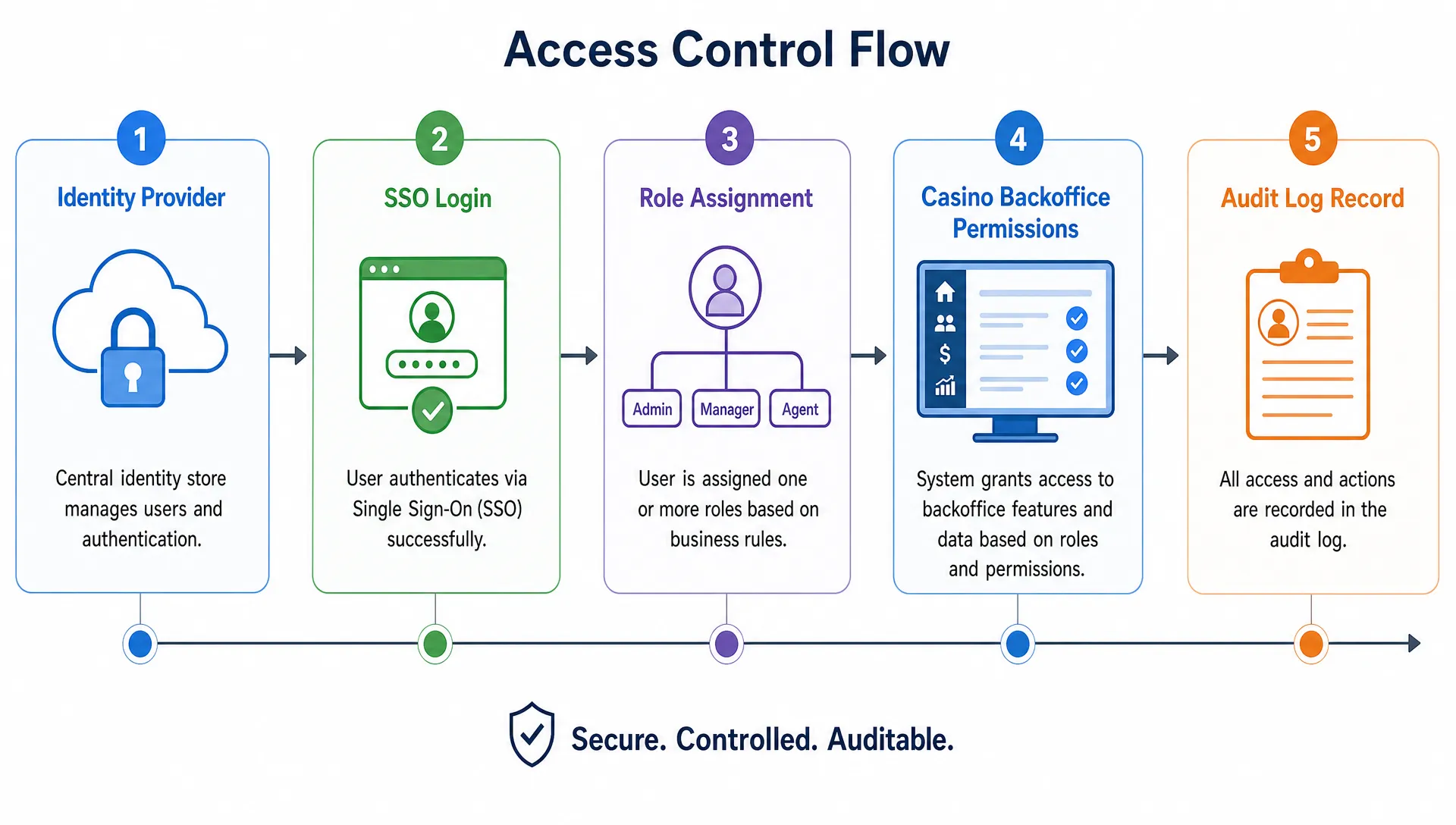
This guide breaks down the practical foundations: how to define roles, structure permissions, map them through SSO, and build audit logs that are useful when something goes wrong.
Why casino SSO needs more discipline than a standard SaaS login
Most SaaS admin tools need access control. A casino backoffice needs access control with financial, regulatory, and operational consequences.
A support agent may need to verify a player's email, but not see full payment details. A payments analyst may need to review withdrawal status, but not change game settings. A fraud analyst may need risk signals and KYC outcomes, but not bonus configuration. A developer may need staging access, but should not have production permissions by default.
The challenge is that casino operations combine several high-risk domains in one environment:
- Player identity and personal data
- KYC, AML, and responsible gambling workflows
- Deposits, withdrawals, refunds, and chargebacks
- Bonus campaigns, free spins, and affiliate incentives
- Game aggregation, slot games, live casino games, and provider settings
- Crypto and fiat payment operations
- Reports, exports, and analytics
If all of that sits behind one generic admin role, the operator has no meaningful control. SSO should be paired with role-based access control, separation of duties, and audit-grade logging. For newer operators, it is also worth reviewing broader casino platform security basics so SSO fits into the full security model rather than becoming an isolated IT project.
Start by defining the access boundary
Before choosing SAML, OIDC, or an identity provider, define exactly what SSO will protect. Many operators make the mistake of connecting SSO only to the main backoffice while leaving payment tools, affiliate portals, analytics exports, or provider dashboards outside the same access policy.
A practical casino SSO setup should consider access to production admin tools, staging environments, payment operations, KYC and AML queues, CRM and bonus tools, affiliate management, game configuration, analytics dashboards, API consoles, and data exports.
The goal is not to centralize everything blindly. The goal is to ensure every privileged human action is authenticated, authorized, and logged under a real user identity. Shared logins, unmanaged vendor accounts, and permanent admin credentials should be treated as exceptions that require written justification and review.
Choose the right identity protocol and provisioning model
Most casino operators will use either SAML or OpenID Connect for SSO. Both can work well, but they solve slightly different problems. SAML is common in enterprise identity environments, while OIDC often fits modern web apps and API-first platforms. The more important decision is not the protocol alone, but how identities and roles are provisioned, updated, and removed.
| Component | What it does | Casino setup guidance |
|---|---|---|
| Identity provider | Authenticates staff users | Require MFA for all backoffice access, especially production |
| SSO protocol | Passes identity to the casino platform | Use SAML or OIDC based on your platform and IdP support |
| Group mapping | Connects IdP groups to casino roles | Keep group names clear and avoid overlapping admin groups |
| Provisioning | Creates, updates, and disables users | Prefer SCIM or controlled just-in-time provisioning where available |
| Session policy | Controls login lifetime and reauthentication | Require step-up checks for sensitive actions such as withdrawal approval |
For authentication assurance, the NIST Digital Identity Guidelines are a useful reference point, especially for multi-factor authentication, session management, and authenticator requirements. You do not need to turn a startup casino operation into a bank-grade identity program on day one, but you do need a clear policy for who can access production and how that access is verified.
Design roles around jobs, not job titles
The most common SSO mistake is copying the org chart into the permission model. Job titles change, teams overlap, and small operators often have people covering several duties. Roles should be based on what users need to do in the platform.
This is where SSO connects directly to governance. Your access model should reflect who owns data, who approves sensitive changes, and who can override controls. If you are still defining those responsibilities, start with a broader casino data governance model and then translate it into SSO groups and backoffice permissions.
A sensible starting model might look like this:
| Role | Typical access | Restrictions to enforce |
|---|---|---|
| Super admin | Platform configuration, role management, emergency changes | Very limited users, MFA required, all actions reviewed |
| Operations manager | Player operations, case queues, team oversight | No direct permission to change financial ledgers without approval |
| Support agent | Player lookup, tickets, basic account help | Mask sensitive data, block payment edits and role changes |
| KYC and AML analyst | Verification cases, risk reviews, document status | No bonus creation, no game configuration, limited exports |
| Payments analyst | Deposit and withdrawal review, PSP status, reconciliation views | No user role management, no bonus manipulation |
| Finance user | Settlements, reports, reconciliation exports | Read-only player support access where possible |
| Bonus and CRM manager | Campaign setup, segments, bonus rules | No withdrawal approvals or KYC overrides |
| Affiliate manager | Affiliate accounts, tracking, commission review | No player identity exports unless explicitly required |
| Game content manager | Game availability, provider settings, lobby content | No payment or KYC permissions |
| Developer or API operator | API keys, staging tools, integration diagnostics | Separate production access, no standing super admin rights |
| Auditor | Read-only access to logs, reports, and configuration history | No write permissions |
For a small team, one person may hold more than one role. That is normal. The control you want is not a perfect enterprise structure. The control you want is clarity: each permission should be intentional, reviewable, and removable.
Build permissions as actions, scopes, and safeguards
Roles are easier to manage when permissions are granular. Instead of creating one large admin permission, break access into actions and scopes.
A useful permission pattern is: module, action, scope, and safeguard. For example, payments.view.production is very different from payments.approve_withdrawal.production. Likewise, bonus.view is safer than bonus.create or bonus.publish.
Permissions should answer four questions. What module can the user access? What action can they perform? Which environment or market does it apply to? Does the action need approval, reauthentication, or extra logging?
| Permission area | Low-risk example | High-risk example | Recommended safeguard |
|---|---|---|---|
| Player account | View account status | Change email or phone number | Log reason code and before-after values |
| KYC and AML | View verification status | Override failed verification | Require senior approval and case note |
| Payments | View withdrawal queue | Approve or reverse withdrawal | Step-up MFA and dual control for large amounts |
| Bonuses | Preview campaign | Publish bonus to live segment | Approval workflow and rollback record |
| Data exports | Export aggregate report | Export player-level PII | Approval, purpose field, and retention policy |
| Roles | View assigned roles | Grant admin permissions | Super admin only, alert on change |
Separation of duties is especially important in payments and bonuses. The same user should not be able to create a risky bonus, apply it to a player segment, approve related withdrawals, and delete the evidence. Even if your team is small, you can introduce lightweight controls such as approval queues, reason codes, and weekly access reviews.
Map identity provider groups carefully
Once roles are defined, map identity provider groups to platform roles. Keep this simple. A casino SSO setup becomes fragile when there are dozens of similar groups such as “ops-admin,” “ops-admin-prod,” “ops-manager,” and “ops-manager-temp” with unclear differences.
Use names that describe the permission outcome. For example, casino-prod-payments-analyst is easier to understand than team-alpha-3. If you operate multiple brands, markets, or environments, include that scope in the group naming convention.
Just-in-time provisioning can be useful for fast onboarding, but it should not create users with broad default access. New users should start with no production permissions or a minimal baseline role. Access should then be granted through approved group membership.
Deprovisioning matters just as much as onboarding. When someone leaves the company, changes department, or completes a contractor engagement, access should be removed from the identity provider and reflected across the casino platform. Dormant accounts should be disabled automatically or reviewed on a fixed schedule.
Make audit logs useful, not just available
Audit logs are often treated as a compliance checkbox. That is a mistake. In a live casino operation, logs are how you reconstruct incidents, resolve disputes, investigate fraud, prove approvals, and understand who changed what.
The OWASP Logging Cheat Sheet gives a helpful baseline for application logging, including what to record and what to avoid. For casino backoffice activity, logs need to capture enough context to be useful without exposing secrets or unnecessary personal data.
At minimum, audit logs should record the actor, action, target, timestamp, source, outcome, and reason where relevant. For sensitive changes, they should also capture before-after values, approval references, and links to related cases or transactions.
| Event category | Examples to log | Why it matters |
|---|---|---|
| Authentication | Login success, login failure, MFA challenge, session timeout | Detect account takeover attempts and access anomalies |
| Authorization | Permission denied, role granted, role removed | Prove access controls are working and catch privilege escalation |
| Player account changes | Email change, account lock, self-exclusion update | Support investigations and responsible gambling controls |
| KYC and AML actions | Document review, override, risk flag update | Demonstrate review history and analyst accountability |
| Payment operations | Withdrawal approval, refund, reversal, payout status change | Reconstruct money movement and investigate disputes |
| Bonus changes | Campaign creation, segment update, bonus cancellation | Prevent abuse and explain player balance changes |
| Data access | PII view, export created, report downloaded | Control privacy risk and monitor excessive access |
| API and configuration | API key created, provider setting changed, webhook updated | Protect integrations, game aggregation, and platform stability |
Audit logs should be tamper-resistant. In practice, that means normal admins should not be able to edit or delete them, timestamps should use a trusted time source, and log storage should be separated from the application where possible. High-risk events should trigger alerts, not wait for someone to inspect a report weeks later.
Financial actions deserve extra care. If an audit log relates to deposits, withdrawals, reversals, or settlements, it should align with the operator's ledger records. For a deeper view of financial auditability, see this guide to casino ledger design for audit trails, reversals, and settlements.
Set retention and review rules before launch
Logging everything forever is not a strategy. It can increase storage costs, privacy exposure, and operational noise. At the same time, deleting logs too quickly can leave the operator unable to investigate disputes or satisfy regulatory expectations.
Retention should be based on data sensitivity, legal requirements, business risk, and investigation needs. Authentication and access logs may have different retention needs than payment approval logs or KYC case histories. The key is to define the policy before launch and make sure it matches the markets where you operate.
Review rules are equally important. A log that nobody reviews is just a database table. Assign owners for weekly access reviews, high-risk event monitoring, failed login analysis, export review, and super admin activity checks. For small teams, this can be a short operational ritual. For larger teams, it may become a formal security and compliance workflow.
Common casino SSO setup mistakes
The biggest problems are usually simple ones. Operators often move fast during launch and accept shortcuts that become expensive later.
Common mistakes include shared admin accounts, too many super admins, no separation between staging and production, support roles that can see full payment data, bonus managers with withdrawal visibility, missing logs for exports, and no alert when admin permissions change.
Another frequent issue is vendor access. Game providers, payment partners, consultants, and developers may need temporary access during setup. That access should be time-limited, scoped, and reviewed. Contractor accounts should not become permanent backdoors into production.
Break-glass access also needs planning. You may need an emergency admin account if SSO or the identity provider fails. That account should have a strong credential policy, offline storage, strict approval rules, and automatic alerting whenever it is used.
A practical launch checklist for casino SSO
Before going live, validate the full access path from identity provider to audit log. Do not test only the happy path where an admin logs in successfully. Test failed logins, permission denials, role changes, offboarding, and sensitive actions.
Use this checklist as a final review:
- SSO is enabled for production backoffice access
- MFA is required for all privileged users
- Roles are based on operational duties, not only job titles
- Super admin access is limited and reviewed
- Payment, bonus, KYC, and role management permissions are separated
- Staging and production access are clearly separated
- User provisioning and deprovisioning are documented
- Vendor and contractor access is time-limited
- Sensitive actions require reason codes or approvals where needed
- Audit logs capture actor, action, target, timestamp, source, and outcome
- High-risk events generate alerts
- Audit logs cannot be edited by standard admins
- Retention rules are documented by event category
- Emergency access is tested and monitored
This checklist is not a replacement for legal or regulatory advice, but it gives operators a practical control baseline before real-money activity begins.
How this fits into a modular iGaming platform
For operators choosing a turnkey casino solution or whitelabel casino platform, SSO should be evaluated alongside the backoffice, payments, compliance, analytics, and game aggregation layers. Access control is not separate from operations. It affects how quickly your team can resolve player issues, approve payouts, configure campaigns, and investigate suspicious behavior.
Spinlab offers a modular iGaming platform for building, launching, and scaling online casinos, with crypto and fiat payment support, game aggregation, KYC and AML compliance, fraud prevention, real-time analytics, and a customizable backoffice admin panel. If you are planning your access model, use SSO roles and audit logs as part of the platform architecture from the beginning rather than as a post-launch cleanup task.
Frequently Asked Questions
What is casino SSO? Casino SSO is single sign-on for casino admin and operational tools. It lets staff authenticate through a central identity provider while the casino platform applies role-based permissions and records sensitive activity in audit logs.
Should an online casino use SAML or OIDC for SSO? Both can work. SAML is common in enterprise identity systems, while OIDC is often preferred for modern web and API-based platforms. The best choice depends on your identity provider, casino software provider, and provisioning requirements.
How many admin roles should a casino backoffice have? Start with enough roles to separate sensitive duties without creating unnecessary complexity. Most operators need distinct roles for support, payments, KYC and AML, bonuses, finance, game management, developers, auditors, and super admins.
What should casino audit logs include? Audit logs should include who performed the action, what they did, what record or setting was affected, when it happened, where the request came from, whether it succeeded, and why it was done when a reason is required.
Do small casino teams still need separation of duties? Yes. Even when one person handles multiple functions, the platform should separate permissions and create approval or review points for high-risk actions such as withdrawals, KYC overrides, bonus publishing, and role changes.
Build access control into your casino from day one
SSO, roles, permissions, and audit logs are not backoffice details. They are core infrastructure for operating a secure, scalable online casino.
If you want a flexible, crypto-ready iGaming platform with a customizable admin experience, explore Spinlab's modular casino platform. Build faster, keep operations cleaner, and make access control part of your launch plan from the start.